What is a Mockup and What is it For? Complete 2026 Guide
Comprehensive guide to mockups: from distinguishing wireframes, mockups, and prototypes to leveraging AI tools to validate your idea with real users before investing in engineering.
The Role of Mockups in Digital Product Design
If you are developing a mobile app, website, or digital platform, you have likely encountered the term mockup. But what exactly is a mockup, and why is it pivotal in the product design lifecycle?
In an increasingly competitive landscape, launching a product without visually validating it with target users is one of the most common — and expensive — mistakes founders make. A mockup is precisely the asset that mitigates this risk, enabling you to visualize, test, and validate your concept before writing a single line of backend code.
Mockups are widely adopted not only for web and mobile interfaces, but also for physical products like packaging, merchandise, and print media. They bridge the gap between abstract strategy and tangible reality, giving designers, engineers, and stakeholders a shared, concrete preview of the finished deliverable.
In this comprehensive guide updated for 2026, we explore foundational principles, comparative terminology, and state-of-the-art workflows — including generative AI — that are reshaping interface design and validation.
What is a Mockup?
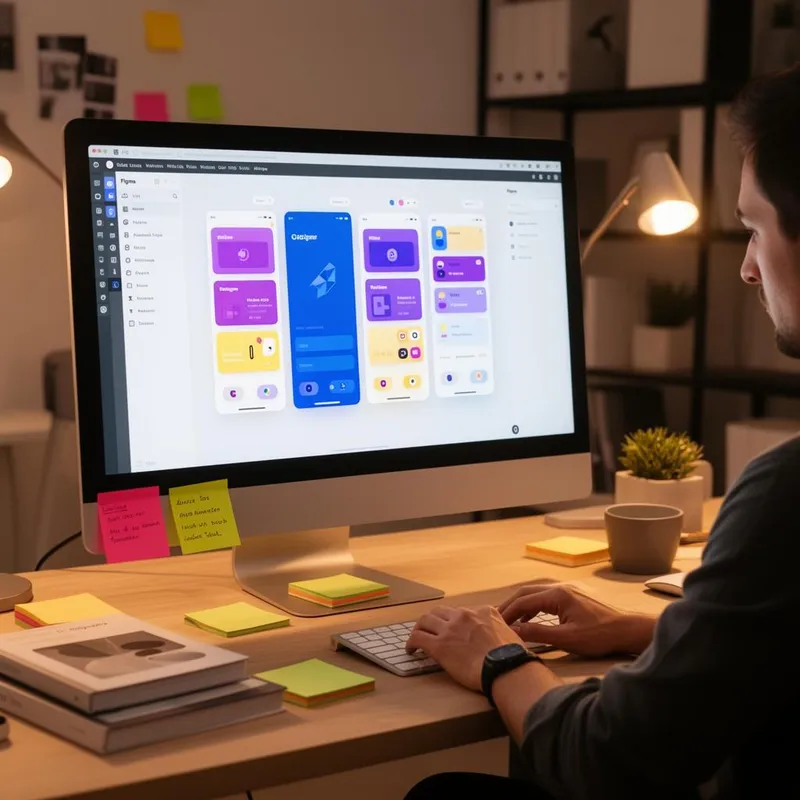
A mockup is a medium-to-high-fidelity visual representation of a product. Unlike a basic sketch, a mockup showcases accurate colors, typography, icons, imagery, and pixel-precise layout placement. It demonstrates how the product will look, without necessarily delivering live interactivity.
Think of a mockup as an architectural scale model: you can see the facade, windows, balconies, and overall proportions — but you cannot turn on the kitchen faucet or live in it. Similarly, a mockup portrays the finished interface before engineering builds the underlying engine.
Mockups preview the final visual experience. Without them, you develop in the dark and incur costly refactoring to resolve misaligned expectations.
A solid mockup answers critical questions: 'Where does the primary call-to-action sit?', 'What is our brand palette hierarchy?', 'How will users navigate between screens?', and 'Does the layout adapt cleanly across device viewports?'.
Wireframe vs Mockup vs Prototype: Understanding the Differences
These three terms are frequently conflated, yet they represent distinct milestones in the design lifecycle. Discerning their roles is vital for founders and product teams.
Wireframe
Fidelity: Low
Interactivity: None
Objective: Establish the structural foundation and layout — element positioning, content hierarchy, and foundational user flow.
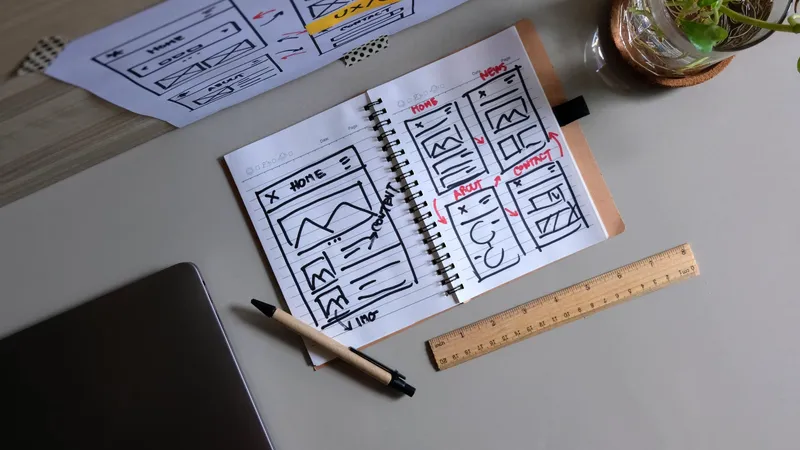
Similar to an architectural floor plan: highlights room layouts without interior decor. Typically rendered in monochrome grayscale without photography or brand styling.
Mockup
Fidelity: High
Interactivity: None or Low
Objective: Showcase the final visual aesthetic — precise colors, typography, iconography, imagery, and exact spatial rhythm.
Like a fully staged showroom model: you perceive every visual touchpoint, but fixtures are non-operational. The mockup is the visual beacon of product definition.
Prototype
Fidelity: High
Interactivity: High
Objective: Simulate the end-to-end user experience — clicks, state transitions, animated modals, and functional navigation paths.
Like walking through a functional display home: you open doors, toggle light switches, and test real ergonomics. Yet it remains a simulation without backend plumbing.
A fourth phase frequently overlooked by founders is the interactive frontend with mocked data. Here, the interface is already engineered with real production code (HTML, CSS, JavaScript/React), but without databases or complex backend infrastructure. Data is simulated via local JSON to mimic an authentic application. This approach is ideal for testing complex interactions with prospective clients, who experience real browser rendering and micro-animations.
At Shinier, we apply this technique during ideation so founders can validate user flows with real friction before committing capital to backend servers, database schemas, and cloud infrastructure. It represents the highest fidelity validation at the leanest cost.
Turn Your Vision into Interactive Screens
If you have a digital product concept but don't know where to start prototyping, Marcius, CEO of Shinier, can guide you. In a free strategic session, he will introduce tools allowing you to craft your own mockups — and mentor your product journey.
Why Build a Mockup Before Writing Code?
Crafting a mockup prior to development is not merely good hygiene — it is a tactical strategy that saves thousands of dollars and weeks of refactoring. Key advantages include:
Early Visualization
Inspect how the finished product will look and feel before committing engineering budget. Founders and investors evaluate a tangible artifact.
Rapid Stakeholder Feedback
Present mockups to prospects, co-founders, and angel investors to gather qualitative feedback before locking in specifications.
Drastic Reduction in Rework
Modifying a screen in design takes minutes; altering frontend and backend logic can take days. Early visual clarity prevents costly rewrites.
Unified Team Alignment
Designers, engineers, and product owners operate in harmony when anchored to an approved, authoritative visual source of truth.
Code-Free UX Validation
Test information hierarchy, button ergonomics, and comprehension before coding, identifying usability hurdles early.
Fundraising & Pitch Collateral
A polished mockup inside pitch decks and investor memos communicates rigor, operational readiness, and product maturity.
In essence, a mockup acts as an insurance policy against wasted capital. Every visual discrepancy resolved during design is an issue that will not require expensive code-level remediation later.
Popular Mockup Tools in 2026
The mockup tooling landscape has expanded dramatically. Today, options cater to every background — from senior UI designers to non-technical startup founders.
Professional Tooling
- FigmaGlobal industry standard. Cloud-collaborative, with vibrant plugin ecosystems, design systems, and advanced prototyping capabilities.
- SketchTailored for Apple macOS designers, celebrated for lightweight performance and native UI workflows.
- Adobe XDSeamless ecosystem connectivity for creators already entrenched in Adobe Creative Cloud (Photoshop, Illustrator).
Accessible (No-Design)
- CanvaPre-built templates for web and mobile. Ideal for founders needing high velocity with zero learning curve.
- GlideTransforms spreadsheets into functional apps. Excellent for testing product utility before final visual polish.
- Marvel AppExtreme simplicity for transforming paper sketches into tap-through smartphone screens.
Artificial Intelligence
- v0.dev / LovableGenerates complete React interfaces from natural language prompts. Ideal for instant code-backed prototyping.
- Bolt.newAllows creation and execution of full-stack browser apps directly inside the browser using agentic prompting.
- Claude / ChatGPTEssential for architecting layout hierarchies, UX copy, and logical user transition flows.
Validating Your Concept with Clickable Mockups
One of the most potent applications of mockups is user validation. Rather than spending months developing a production platform only to discover weak product-market fit, you can deploy a clickable mockup to real users within days.
The process is straightforward: construct core screens in Figma (or via AI scaffolding), link navigation triggers, and share the interactive link with target prospects. Prompt them to complete specific objectives — 'Locate the checkout button', 'Navigate to account settings' — and observe friction points.
This qualitative testing exposes usability hurdles that are impossible to foresee through static visual inspection alone. A layout element that feels intuitive to a designer may be completely overlooked by an everyday user.
In practice, validating with interactive mockups answers three fundamental questions:
- Do users grasp what the product solves? — If they require extensive onboarding explanations, the design must be refined.
- Can they complete primary jobs-to-be-done? — Stumbling in a core workflow signals an information architecture bottleneck.
- Would they pay for this solution? — The ultimate validation signal. When mockups trigger purchase intent, you have confirmed product viability.

The Fidelity Journey: From Napkin Sketch to Production Code
Product design in 2026 follows an iterative continuum of increasing precision. Understanding each tier guarantees that you allocate the right effort at the appropriate phase.
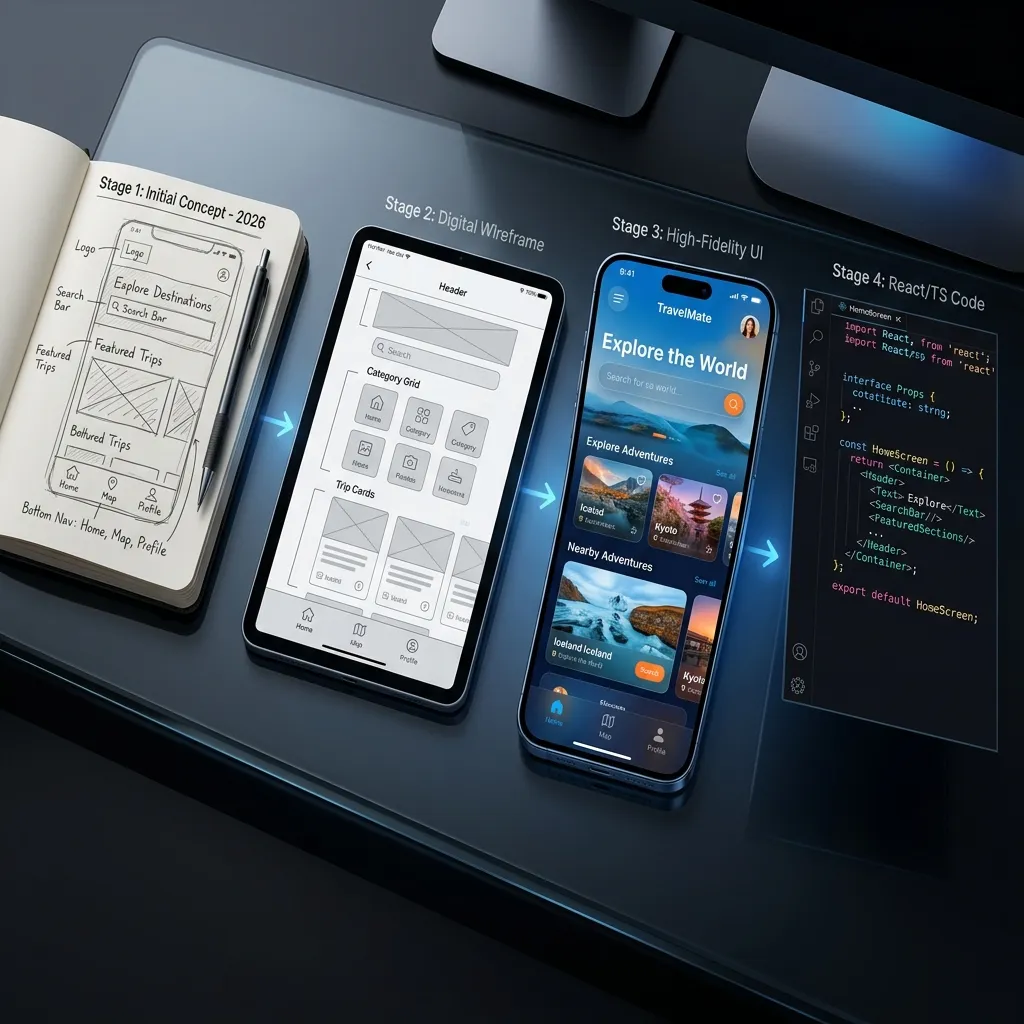
Technical evolution workflow: Paper Sketch → Wireframe → Mockup → Production Code (React/TS)
Paper Sketch (Initial Concept)
The fastest and most cost-effective method to brainstorm raw ideas. Focuses purely on macro layout. Mistakes here cost pennies and minutes.
Digital Wireframe (Architecture)
Translating paper sketches into digital canvases (Figma/Whimsical). Strips away aesthetics to concentrate on information hierarchy and navigation paths.
High-Fidelity Mockup (Visual Branding)
Full injection of brand identity, modern typography, and cohesive design systems. This is the artifact presented to inspire investors and customers.
Interactive Frontend with Mock Data (Live Validation)
The gold standard of pre-backend validation in 2026. The interface is coded in React/TypeScript, allowing users to click, scroll, and submit inputs with realistic UI state changes.
AI Generates Mockups, but Expert Designers Elevate Them
Prior to mainstream AI adoption, contracting an agency to design a clickable Figma mockup commanded approximately $500 to $1,000+ depending on scope. That covered competitive research, design token libraries, user journeys, and revision cycles.
Today, tools like v0.dev, Lovable, and Bolt.new produce workable interfaces in minutes and at near-zero initial cost. This has democratized software prototyping for bootstrapped founders.
However, a critical trap emerges: AI-generated interfaces often lack distinct identity. They default to predictable component libraries, repetitive layouts, and cookie-cutter aesthetics. When competitors rely on the same models, their applications feel identical.
This is where an experienced product designer creates decisive competitive edge. Seasoned UI/UX practitioners understand cognitive ergonomics, accessibility norms, brand distinctiveness, and conversion psychology. They transform a utilitarian layout into a memorable, high-converting digital experience.
The winning playbook in 2026 is blending generative AI with human craftsmanship: leverage AI for rapid structural drafts, then partner with veteran designers to curate, polish, and distinguish your product.
Shinier Specialized Design Collective
Shinier provides access to expert product and frontend designers with over 8 years of proven industry experience. Our specialists engineer every viewport to ensure your software stands out from generic AI templates.
Take the next step today: apply as a startup and initiate your structured ideation cycle. Our team will collaborate with you to craft high-impact mockups and validate your market hypotheses.
Register and Launch IdeationPractical Case Study: From Napkin Sketch to Validated MVP
Let's explore a real-world scenario. Anna envisioned a project management app designed specifically for freelance creatives. Without coding experience and working on a lean personal budget, she structured her rollout as follows:
Paper Sketches
Anna sketched out 5 core screens in her notebook: authentication, dashboard, task kanban, project detail, and preferences. Elapsed time: 30 minutes.
Wireframes in Figma
Utilizing open community UI kits, she drafted digital wireframes to finalize hierarchy and navigation flows. Elapsed time: 2 hours.
AI Mockup + Expert Polish
Anna leveraged Lovable to generate baseline UI components from prompts. She then collaborated with a Shinier mentor who refined typography, palette contrast, and spacing tokens. Elapsed time: 4 hours.
Clickable Prototype
The high-fidelity mockups were linked into an interactive Figma prototype with animated micro-transitions. Anna distributed the link to 10 active freelancers for unmoderated testing. Elapsed time: 1 hour.
User Feedback Iteration
Informed by user behavior ('The deadline badge is hard to scan', 'A tag filter is missing'), Anna iterated on the designs. Within 3 review cycles, the UX was validated and ready for engineering.
Outcome: Anna validated real market interest, clarified precise functional scope, and possessed an approved UI system — all before spending a dollar on backend development. Her only outlay was focused effort and free software tiers, bypassing the risk of a premature $10,000+ development build.
Best Practices for High-Impact Mockups
Regardless of your chosen tooling, these design fundamentals ensure your mockups convey authority and professionalism:
Adopt an 8pt Grid System
Consistent geometric rhythm creates effortless visual harmony. Use 8px or 4px spacing increments to align typography, cards, and containers.
Maintain Systemic Consistency
Establish reusable tokens for colors, typography scales, and button states. Design systems accelerate iterations and preserve visual coherence.
Incorporate Realistic Content
Avoid 'Lorem ipsum'. Real copy uncovers boundary cases and line-wrap bugs that placeholder text obscures. Use actual names, currency values, and copy.
Design Mobile-First Responsive States
Architect mockups for both smartphone and desktop viewports. Over 60% of modern web traffic originates from mobile devices.
Establish Clear Visual Hierarchy
The most crucial action on screen must command immediate attention. Use scale, contrast, and whitespace to orchestrate the user's focus.
Test with 5 Representative Users
Usability research confirms that testing with just 5 users uncovers up to 85% of critical interface flaws. Never delay validation waiting for massive panels.
When Should You Deploy Mockups in the Product Lifecycle?
Mockups are not merely aesthetic exercises; they are strategic assets deployed at pivotal moments throughout software development:
- Pitching to Investors & Enterprise Clients — Showcase finished interface polish in pitch decks and executive demos. A high-fidelity mockup is worth dozens of abstract slides.
- Pre-Development UX Validation — Test visual and navigational hypotheses before committing engineering sprints. Catching issues in Figma prevents rewriting code.
- Pre-Launch Marketing & Pre-Sales — Use mockups in teaser landing pages, social announcements, and presale funnels to quantify organic demand prior to product launch.
- Engineering Handoff & Documentation — Serve as definitive visual specifications for frontend developers. Color codes, padding, typography scales, and component states are captured unambiguously.
- Strategic Redesigns — Before refactoring existing production applications, prototype proposed redesigns with legacy users to validate adoption before deployment.
Frequently Asked Questions About Mockups
Do I need design expertise to create a mockup?
Not necessarily. Modern tools like Canva and Glide enable non-technical creators to assemble mockups. AI generators like Lovable and v0.dev scaffold interfaces from text descriptions. However, for a differentiated and commercially viable product, working with an experienced UI/UX designer is strongly advised.
What is the best tool for creating mockups in 2026?
It depends on your workflow. For dedicated designers, Figma remains the undisputed standard. For non-technical founders seeking speed, Canva and Glide offer immediate utility. For generating live code prototypes, v0.dev, Lovable, and Bolt.new represent the leading edge.
How long does it take to produce a mockup?
A foundational wireframe can be sketched in 30 minutes. A high-fidelity screen set typically requires 4 to 16 hours depending on density. With AI scaffolding tools, initial drafts can be assembled in minutes.
Does a mockup replace an interactive prototype?
No. A mockup demonstrates visual styling; a prototype provides functional flow and interactive states. They serve complementary roles across the design funnel, and ideally both precede heavy coding.
What is frontend with mocked data?
It is an interface developed in real frontend code (such as React) operating without live backend or database infrastructure. Data is fed from static JSON objects. Users navigate genuine DOM elements and state transitions as if using a finished platform.
Referências
- NIELSEN NORMAN GROUP. Wireflows: A UX Deliverable for Workflows and Apps. Industry reference on wireflow artifacts and distinguishing design deliverables. nngroup.com
- INTERACTION DESIGN FOUNDATION. Mockups — Topic Overview. Academic reference examining the role of mockups within user-centered design methodologies. interaction-design.org
- PRESSMAN, Roger S.; MAXIM, Bruce R. Software Engineering: A Practitioner's Approach. Covers prototyping methodologies and mockup cycles in the software engineering process.
- GARRETT, Jesse James. The Elements of User Experience: User-Centered Design for the Web. Berkeley: New Riders. Foundational reference on visual representation before engineering.
- FIGMA. Collaborative interface design platform. Market standard for crafting wireframes, design systems, and clickable prototypes. figma.com
- CANVA. Accessible graphic design platform providing pre-built layouts for web mockups, decks, and marketing visuals. canva.com
Ready to Transform Your Idea into Interactive Screens?
Join Shinier as a startup founder and kick off your ideation phase. Our designers and CEO Marcius will mentor you through crafting professional mockups and validating your product with real users.
blogPages.oQueEParaQueServeUmMockup.ctaFinal.buttonText